Showing posts with label Planning. Show all posts

Wednesday, 11 February 2015

Storyboard - Demons DRAFT

Here is a draft copy of my story board, we haven't yet finished filming so there are some blank spaces that will need filling with the rest of the shots such as when Hattie and her mum argue. Hopefully these will be filmed by half term so I can update this as soon as that is done and dusted!


I have put question marks in the spaces where there will eventually be shots of the argument scene. 


Thursday, 5 February 2015

Shot List 1 - Demons


Here is the first shot list for our music video. There will be a 'Part 2' of a shot list coming soon, We just need to finish editing our video so that I can screenshot some more shots. I used a random mug from the media cupboard as my fabulous model. Enjoy!

Update and Filming Photos!

Hello again!

It's been a busy day today, Molly and I finally got around to finishing most of our filming! After a long, long wait, it is very nearly complete. All we have left to film is a few scenes with Molly and her family arguing, and a few shots with Maddie to fill in gaps and we should be good to go! I managed to get a few pictures of us filming our final clips and these are below as filming evidence. Also, I have completed Past Student Music Video Examples and these are up on the blog, there is analysis for 'Viva Brothers', 'Crash' and a video from another school 'Can't Hold Us'. I also managed to post my analysis of Past Student Auxiliary Tasks. I analysed all three types of tasks, although I did choose to do a website and poster after this. I had already decided to do a website but was still torn between a digi-pack and poster.

In the next few days I hope to have my draft evaluation up on the blog, although not my final answers. I am slightly behind on these I have been focused on my auxiliary tasks but I have completed both questions 1 and 2 and hope to have these up on the blog tonight/tomorrow; and will continue work on the last two questions tonight also. Also being put on the blog tonight is a shot list for our video and a draft of my poster, which I did do a while ago but forgot to put up here! Hopefully the final poster will be up by tomorrow too, so expect lots of blog posts in the next few days!

Finally, here are some photos of us filming our final performance scenes -

Friday, 30 January 2015

Update on Blogging, Filming and Editing

I have spent my study period today watching two past student examples in order to be able to analyse and put my analysis up on my blog soon! I have already analysed the 'Viva Brothers' video and my blog post for that is already up! However, today I watched the 'Crash' and a student example from another school. I plan to have both posts up about these videos within the next few days. 

After I have completed these, I am moving onto analysing past student auxiliary tasks, I realise I am a bit far behind with these, however, I have finished both of my tasks and the website is up on the blog already. My poster is pretty much finished I just need to get a few more images and change a few bits around and that should be up within a few days too! My website is as finished as it can be, as we have not yet finished filming our music video; I cannot put the finished video up on the website; but, I have included a draft video and as soon as we have completed editing and filming, I will change the draft video on the website to the finished one and re post it on the blog. 

In terms of filming and editing updates, we plan to film some more scenes within the next week and hopefully have them all edited very soon. So expect some updated footage very soon!

Moving onto my evaluation. I have started to answer some of the questions but will still need a bit more time to develop my answers, and will hopefully have them all drafted by next Friday, watch this space!

Tuesday, 6 January 2015

Storyboard: Demons

Slideshares didn't work when uploading this so I had to use the good old screen shots. So this is our storyboard, give or take a few shots! 

Friday, 5 December 2014

Photoshop Lesson

In today's lesson we spent time looking at how to use photoshop and develop our skills in the programme in order to produce our auxillary tasks. I have chosen to use a website and a poster as my two tasks. Therefore, photoshop would be a big part of the tasks.

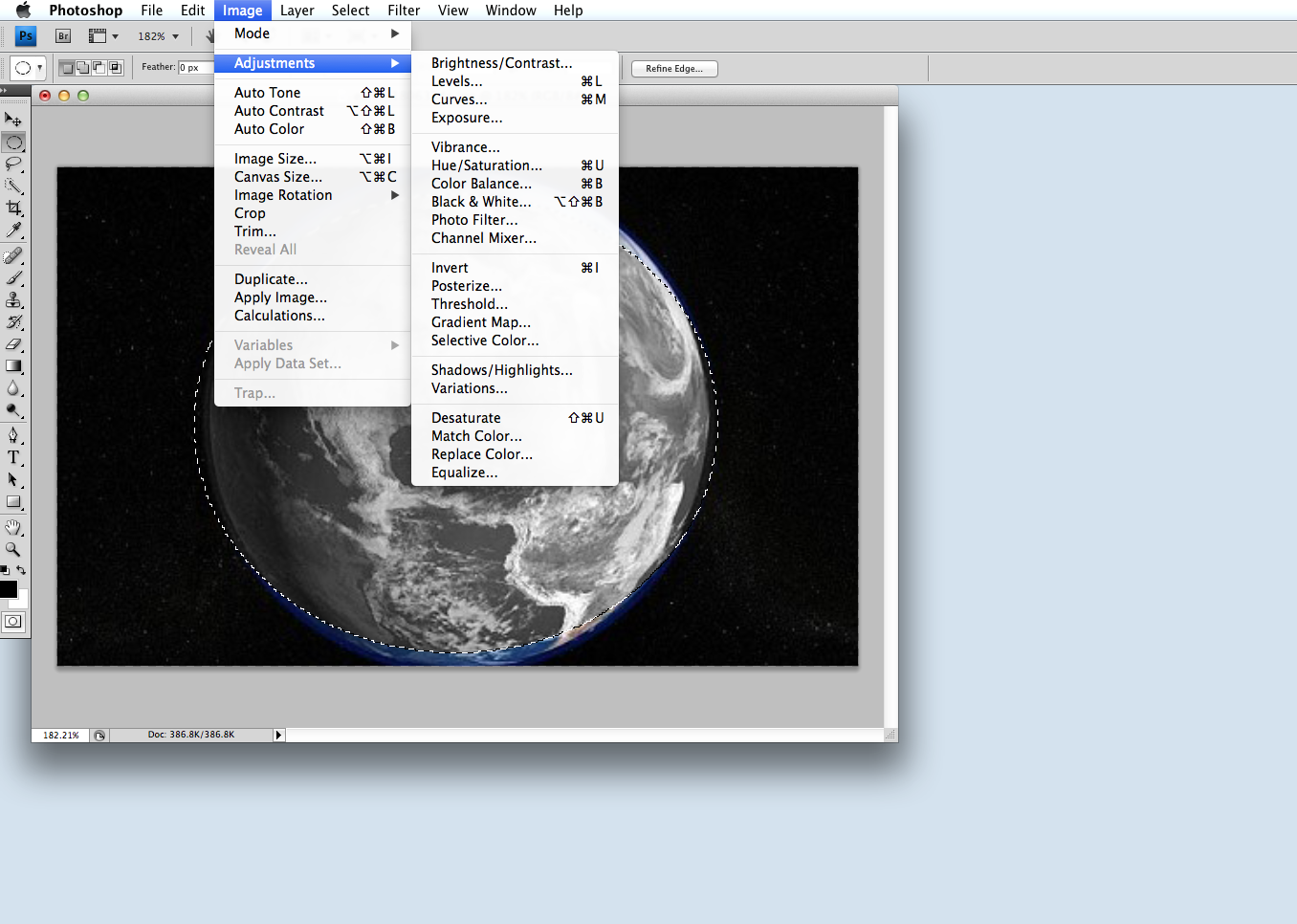
I started off by taking a simple image of the earth and inserting it into photoshop.
After I had done this, I started to play with some of the tools and found thing such as the rectangular marquee tool and the lassoo tool. These meant that I could cut around the shape of the earth, without having the black backround in it. Using photoshop also meant that I could zoom right into the edges of the earth and not miss any of the edge out. I also found the lassoo tool helpful in keeping everything one shape and being able to add bits in when I had gone wrong.

Another tool I found useful, paticularly for this image, was the eliptical marquee t
ool. This meant that I could draw circles around circular objects and move the cut out to position them in the right place. This was very helpful bearing in mind the earth is round, and I only wanted the picture of the earth.


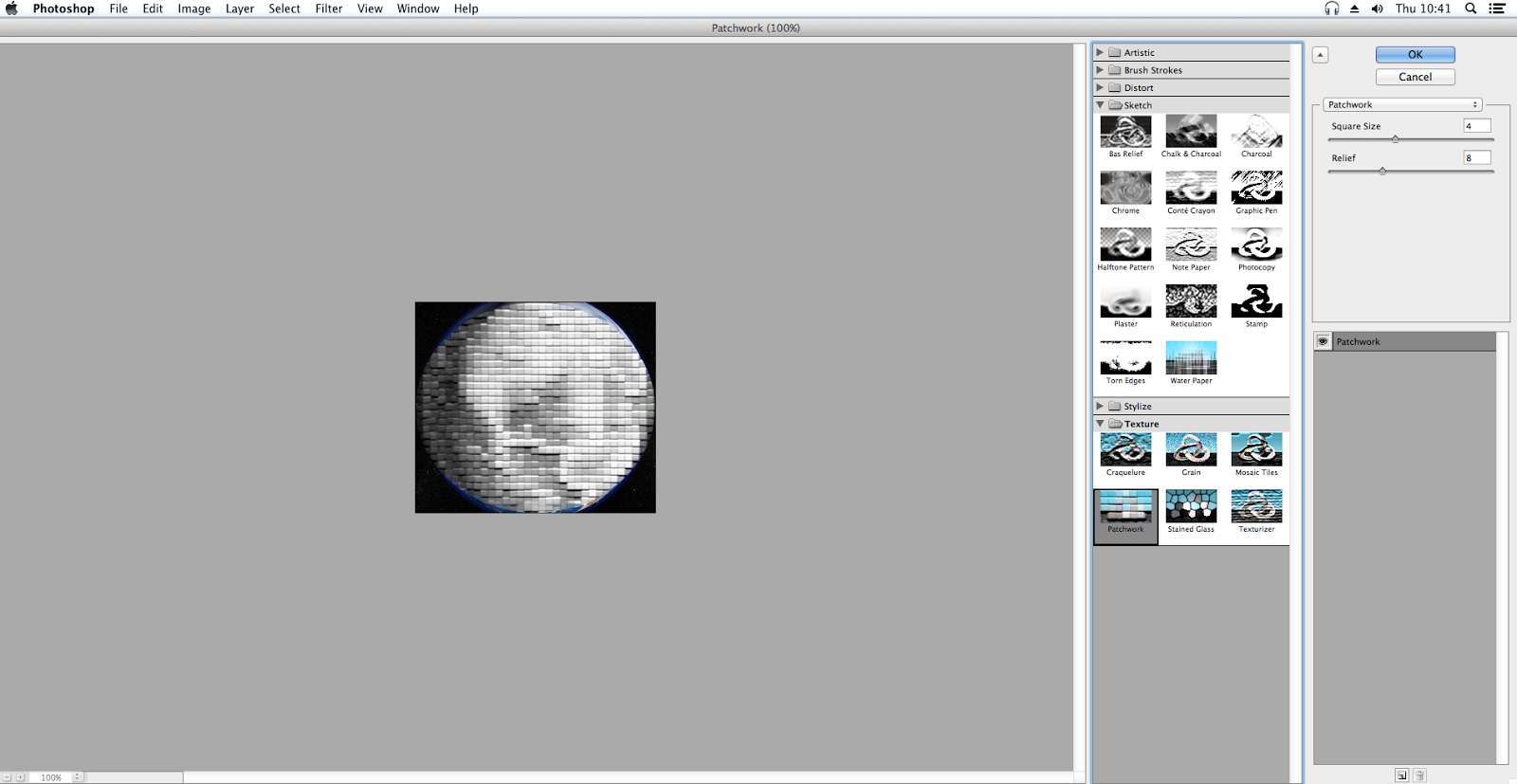
The next tools I started to play around with were the adjustments, I found that there were so many options that I could use, such as artistic, brush strokes, distortion, sketch and texture. These all gave different effects and could be used if I wanted to really change my image. I chose to use the patchwork option under texture as a test. I also changed the colour of my image to black and white.

Overall, I found the photoshop lesson to be really useful in developing my skills and I have started to put them to use with both of my auxillary taaks.

Below is a picture of some of the images that I created using photoshop.


Friday, 14 November 2014

Update on Editing and Filming - 14th November 2014


Quick Update on editing and filming - Created with Haiku Deck, presentation software that inspires

Our 3 Key Ideas


If the presentation doesn't load, here is the link to the website I created it on as I had trouble getting it to load on the blog.

http://www.powtoon.com/show/eCqkI7aKUhm/a2-media-music-videos-our-3-key-ideas/#/

Sunday, 9 November 2014

Update on Filming

Today, we started the filming process of our coursework. We managed to film lots of footage and take pictures in Nowton Park for a few hours. We didn't get time to go to the Abbey Gardens as we lost the light but we are really happy with what we got in the short time we had. Hopefully, we will continue with our principal filming in the following weeks and start to be able to piece together both a draft and our final film. Aswell as the footage from Nowton Park, we also filmed some footage in the car of Molly and Maddie singing along to songs and dancing. 

Finally, I plan to start on a storyboard very soon and hopefully once we have imported lots of footage and pictures we will be able to upload them soon so that you can see exactly what we filmed on today. Pictures to follow! 

Friday, 7 November 2014

Filming Plan

On Sunday, Molly and I will be starting our filming process. We hope the whether will be good! Fingers crossed! We plan on filming between 3 locations; the Abbey Gardens, Nowton Park and London. We will not be able to get to London for the next week or so. But we will definatley be filming in the other two locations over the weekend and hopefully get a majority of the principal filming complete. 

We still need to sort out exactly what props we will need and we will soon be posting our storyboard up on the blog, we just need to get some photos. We are planning to include a range of different shots and angles, as well as some other techniques we have learnt along the way. Hopefully, we will get some good footage and be able to start playing around with what we get in our next lesson! 

Here are some photos of the locations we are planning to film in - 


London Eye, Nowton Park, Abbey Gardens


Lesson Update - 7th November

Wednesday, 5 November 2014

UPDATE:

I thought you would like to know a little update on how I'm getting on. I'm trying to keep up to date on blog posts by going through the check list to see what I have and haven't done. Also I have managed to do the casting for my music video.

The two girls are going to be: Me (for my sins) and Maddie Byford. Maddie volunteered to be in it and as me and her have such a close relationship I thought it would be easy to act close in the video.

Me:                                                    Maddie:
From these photos you can see that me and Maddie have been friends for a number of years with the first photo being from our last days at main school (May 2013) the second being during We Will Rock You (Feb 2014) and the most recent being taken for a student party (Oct 2014). 
This proves that we are ideal candidates to star in my music video as I wanted two people who were very close and that the acting wouldn't be very hard for. 
Safe to say we've changed quite a lot!

So, filming plan!!
Our idea is to start filming this weekend on Sunday 9th November. My current idea is to film a couple of scene at Nowton Park. This is an ideal destination as in the autumn it's going to look very pretty with all the leave coming off the trees and it can look like a realistic day out for a couple. Another scene could include sitting on the sofa at home chilling and watching films. I hope to one day go to the beach or somewhere with a lake as another. The Abbey Gardens are also an idea of another location as we can feed the ducks and look cute ;). I also considered going to London for the day and doing some filming there as that would be perfect. But I'm going to have to see how much it is going to cost. 

I looked at the weather for this sunday and this is what is forecast #typicalenglishweather

And I got some photos of some ideal locations #relationshipgoals

So thats the plan so far, I am blogging as much as possible so I should have some more blog posts up in the next few days #onit

Tuesday, 4 November 2014

Research: Audience Questionnaire

I concocted a survey on the general subject of music and music videos and posted it on both Facebook and Twitter. I had a total of 68 people complete it giving me a large variety of age ranges. Here is the collation of my results and how they effected my view on how I'm going to produce my music video.

Question 1: Are you Male or Female?


For this I tried to get an equal split of both boys and girls so I could find out the interests and preferences of both genders to make my video appeal to both audiences. Luckily there was a rough split of 29 Males and 39 Females so I should have got a good result.


Question 2: How old are you?


I had a massive variety of ages from 12 years old to 57 years old. Not entirely sure how the 57 year old found it?! But as you can see the main ages that answered the survey were teenagers which was very useful as my target audience for my music video is teenagers. Therefore the answers they have given are very relevant and helpful to make my music video appeal to them


Question 3: How often do you listen to music?


From this question I found that not a single person who answered the survey doesn't listen to music daily. Which shows that music has a very big impact on everybody's lives whatever age range you are. There is also a very large proportion of people who listen to music for over 5 hours which is a very large portion of your day.


Question 4: How do you generally listen to music?


A large portion of the people I surveyed listen to music on their phones of through the radio. The radio is generally very up to date pop and rock music whereas on your phone you can choose your music depending on your preference. Youtube is another popular way of accessing music which shows that lots of people do watch the music videos too. A few people mentioned that they use sound cloud to access their music too.


Question 5: What is your favourite genre of music?
Almost half of the people surveyed said their favourite music genre was pop or rock which is very useful as the music video I have chosen to create is a pop song. This question had the most varied of answers as there are so many options for people to choose. Reggae and Punk were two other options that people mentioned which I didn't choose to include in the options as I forgot about them, but obviously many people listen to it.


Question 6: What is your favourite music video and why?
Obviously I couldn't produce a pie chart for this question as there were 68 different responses. But mostly I found people like music videos that stand out and are different from others. For example Aha's - Take on me was a few peoples favourite music video as they said it was the first of its kind.
Another one that was mentioned and popular was Thanks for the Memories - Fall Out Boy because of the narrative is different to any other music video that they had seen. 


Question 7: What is your favourite type of music video?


Over 50% of people said they like the narrative type of music video which means that my music video is very fitting to appeal for most people as I have chosen to do a mixture of performance and concept.


Question 8: Do you generally listen to music or watch music videos?


It was interesting to see that very little people only watch music videos, the majority of people like to just listen to music but you can see that many people like to do both. This could show that people need to like the song before they will watch the music video to it.


Overall I found this survey very insightful and I'm very flattered that so many people took the time to give me some very helpful results.


Saturday, 1 November 2014

Division of Labour

We have decided on a division of labour between myself and Molly; and thought about which jobs suit which person best. Also, how much time can we each commit to each job.

Molly - Molly will be in charge of doing most of the editing as her skills in Final Cut are far better than mine, although I will be doing some of it. We decided this job was also best suited to Molly as she has more time to be able to focus on editing our video than I do. Molly will also be in charge of some mise en scene elements such as costume and location (she decided on our characters wearing everyday causal clothing and our video being shot in 3 different locations, her house, Nowton Park and in a quiet room). Also, Molly will be in charge of assigning actors to our video, we put a message on Facebook asking for two people, but in the end Molly decided to use herself as one actor and our friend Maddie as the other. Molly is also partly responsible for deciding on camera angles and shots to use at what times in our video, and help them fit with the lyrics and music; and have some meaning as to why we use them when we use them. Aswell as all of these jobs, she is also partly involved in the narrative outline, we both came up with this together, but Molly was involved in really developing the story and plot of our music video. 

Jess - My jobs include being the main filmer in the video and I am responsible for making sure that we get what footage we need at the time we film. I also set up the camera to make sure we have the right camera angle; and I also make sure we film the right amount of footage. I am also partly responsible for deciding on camera shots and angles to use and when to use them. This was an important job for me as I am the one mainly always behind the camera as Molly will be always acting. I am also in charge of the other parts of mise en scene such as props and lighting. I decided on the piano that we will have Hattie playing in our video, and also the idea of the couple using the forestry as part of their props when we film in the forest e.g. the leaves being thrown. Lighting is also my job and I am in charge of making sure lighting is right for the right mood/tone, and is also continuous. Finally, I am also responsible for participating in creating a plot and narrative for our characters and Molly and I worked together on getting a really strong plot to go on.

I think we assigned these jobs to the right people well and hopefully the outcome of our project will reflect that!

Friday, 31 October 2014

Production Scehdule


Unfortunatley, the software I used (tiki-toki.com) did not allow me to embed my timeline onto my blog without paying for a full upgraded membership. Therefore I have had to take screen shots and use them instead. Here is also a link to my timeline too - 

Wednesday, 15 October 2014

Planning: Shot List

Although this is my plan it is not set in stone so if I have any marvellous ideas whilst I am filming I shall include them so some shots may change due to my brilliance ;)


Saturday, 11 January 2014

Research: Previous Evaluations

To prepare for my own evaluation I have looked into previous examples work. Then I shall comment on what I liked, disliked, what worked well, what could have improved, and how this is going to influence my own evaluation.
Student Evaluation 1:


I found this an excellent evaluation, each question was answered comprehensively and creatively. I liked the fact they used a different piece of technology for each question making it more interesting and interactive than just reading off a screen. 

However one thing that could have improved was the font size on the Prezi as at times it was quite difficult to read, also it could have done with a bit more colour as with large chunks of text sometimes I found it a little boring to keep reading on.

I feel the use of Glogster was excellent as it is a difficult piece of technology to use yet they have used it to its full potential by making it really creative yet simple in following the questions. 

Looking at this evaluation I really like the way it is set out in a Prezi therefore I will put the idea forward to the group to present it as such.

Student Evaluation 2:

http://team7media.blogspot.co.uk/search/label/Evaluation


This evaluation is much different to the previous one I looked into as the questions weren't all together they were on 7 different blog posts. I feel that it took a bit of effort going from one to the other instead of it just being one click and then it being right in front of you.

I liked how they used stop animation for one of their questions, however I found it quite hard to understand what they were saying and the voices had been made really high pitch and were speaking at rocket speed. The idea of it though was excellent.


Something that could have been better was their question 5. For this they created a sequel to their preliminary task whilst answering the question. Which for me (someone who hadn't watched the preliminary task) found it exceptionally confusing as I did not really know what was going on.

I liked how they answered the first question as it included screen shots and videos of what they were actually talking about. However I found the post a bit text heavy.


Student Evaluation 3:
http://studio101hna.blogspot.co.uk/search/label/Evaluation

For this evaluation my first impression was that it was quite messily arranged on their blog, I had to go searching for their questions unlike the other two. Also I found the questions were not in order. 

I liked the use of Padlet in question two, as it included photos to back up what the text was saying, also the photos were bright which attracted your attention to them. 
I also liked how they used Prezi in question 3 as it is more interactive and colourful and you can navigate round the page yourself. However I feel it could have done with a few more images. 


Overall I found this the weakest evaluation as the questions were not a group effort they were handed out to a single person, and for some of the questions, some people did not make the same effort as others.